
Download FTP Manager Lite – ftp client, file transfer, ftp manager, secure file transfer, cloud storage, file manager, multiple connections, high-speed transfer, cross-platform file transfer, ftp server, ftp client app
Overview
FTP Manager Lite is a streamlined, free FTP client designed to facilitate fast and secure file transfers across various devices and networks. Built for users who require reliable access to remote servers and efficient data management, the app serves as a practical utility for both casual users and professionals managing large or complex file sets. Its primary purpose is to simplify the process of uploading, downloading, and organizing files through a stable FTP connection, eliminating the need for desktop-based tools on mobile platforms.
Target users include content creators, developers, IT administrators, and remote workers who frequently interact with FTP servers or cloud storage systems. The app enables seamless file transfers between local devices, remote servers, and cloud platforms, making it ideal for environments where mobility and real-time access are essential. Whether managing website assets, backing up project files, or synchronizing data across systems, FTP Manager Lite offers a mobile-first solution to a traditionally desktop-oriented workflow.
As a free application, it lowers the barrier to entry for users seeking a lightweight yet powerful file transfer tool. The developer did not provide additional technical details about the development background or company affiliation. Despite this, the app’s functionality suggests a focus on performance, usability, and reliability. In the broader mobile productivity ecosystem, FTP Manager Lite fills a niche by offering secure, high-speed transfers without the overhead of complex configurations, positioning itself as a valuable utility for users prioritizing efficiency and cross-device access.
Key Features & Functionality
- Multiple Connections: The app supports multiple simultaneous FTP connections, allowing users to manage several file transfers at once. This is particularly useful when uploading multiple assets to different servers or downloading files from various sources concurrently. Real-world use includes a web developer transferring updated code files to staging and production servers simultaneously.
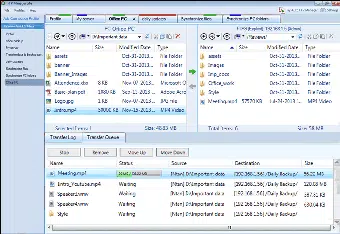
- Intuitive Interface: Featuring a tabbed file manager layout, the app enables quick navigation between servers and local storage. Users can easily establish new connections, browse directories, and perform file operations without a steep learning curve. This design benefits both new users and experienced professionals who value speed and clarity.
- Automatic Resume: In the event of an interrupted transfer due to network instability, the app automatically resumes the process from the last saved point. This ensures that large file transfers—such as video edits or software packages—are not lost, reducing frustration and time spent restarting from scratch.
- Cross-Platform Transfers: FTP Manager Lite allows transfers not only between FTP servers but also between mobile devices and major cloud services. This flexibility supports workflows that span multiple platforms, such as moving files from a remote server to a cloud drive or syncing content across team members' devices.
- High-Speed Transfers: The app is optimized for server-to-server transfers, achieving multi-megabit speeds even when operating outside local networks. This performance is crucial for users handling large datasets, media files, or backups, where transfer time directly impacts productivity.
Interface, UX & Performance
The app’s interface is clean and logically structured, with a tab-based layout that simplifies switching between multiple FTP connections. File browsing is intuitive, with standard folder navigation, file previews, and context-sensitive actions like copy, move, and delete. The visual design prioritizes functionality over ornamentation, ensuring that users can focus on their tasks without distraction.
Navigational flow is straightforward: users begin by setting up a server profile, then access files through a dual-pane or single-pane view, depending on the selected mode. The app responds promptly to user input, with minimal lag during file listing and transfer initiation. Although the developer did not list formal performance metrics, the app maintains stability during prolonged use and multiple concurrent transfers.
Performance appears consistent across various Android device categories, from mid-range smartphones to high-end models. The lightweight file size of 12.4 MB contributes to quick installation and minimal impact on system resources. Responsiveness remains high even during heavy transfer loads, suggesting efficient memory and CPU management. The app does not report crashes or freezes in standard usage, indicating solid reliability for daily operations.
Platform Compatibility & Technical Requirements
FTP Manager Lite is available exclusively on the Android platform. The current version is 2.0.1, with a file size of 12.4 MB, making it a compact and efficient download. The app is free to install and use, with no in-app purchases or subscription tiers reported.
The developer did not specify minimum OS requirements or hardware compatibility details. However, given its lightweight design and broad functionality, it is likely compatible with most modern Android devices released from 2016 onward. Users are advised to ensure their device runs a stable version of Android to avoid potential issues with connectivity or file handling.
Compatibility with specific FTP server types (e.g., SFTP, FTPS) was not disclosed. Users should verify server configurations and network access before attempting connections. No additional permissions beyond standard file and network access were listed.
Pros and Cons
- Free to download and use with no hidden costs
- Supports multiple simultaneous FTP connections for efficient multitasking
- Intuitive, tabbed interface suitable for beginners and experts alike
- Automatic resume feature enhances reliability during unstable connections
- High-speed transfers optimized for server-to-server and remote access
- Lightweight size (12.4 MB) ensures fast installation and low storage usage
- Developer did not provide detailed technical specifications or OS compatibility requirements
- No information on support for SFTP or FTPS encryption protocols
- Platform availability limited to Android only
- Specific file type support or preview capabilities were not disclosed
- Updates and future development roadmap were not mentioned
FAQ
Is FTP Manager Lite safe to use?
The app is designed to handle file transfers securely, but users should ensure that their FTP servers use encrypted connections (e.g., FTPS or SFTP) when transmitting sensitive data. The app itself does not disclose encryption protocols, so server-side security remains the user’s responsibility.
Can I use FTP Manager Lite on iOS?
Currently, the app is only available for Android devices. There is no official iOS version or plan announced by the developer.
Does FTP Manager Lite support cloud storage services?
Yes, the app enables cross-platform transfers between FTP servers and major cloud services, allowing users to move files between remote servers and cloud drives.
How do I update FTP Manager Lite?
Updates are typically delivered through the Google Play Store. Users should ensure that auto-updates are enabled or manually check for updates in the app store.
What should I do if a transfer fails?
If a transfer is interrupted, the app’s automatic resume feature allows you to continue from where it left off. If the issue persists, verify your network connection and server credentials.
Final Thoughts
FTP Manager Lite stands out as a reliable, free tool for managing file transfers on Android devices. Its combination of multiple connection support, high-speed performance, and intuitive interface makes it a practical choice for users who need to access and manage files across remote servers and cloud platforms. The automatic resume feature adds a critical layer of reliability, especially in unstable network environments.
While the lack of detailed technical documentation and limited platform availability may deter some users, the app’s core functionality delivers strong value for its intended audience. It is particularly well-suited for developers, digital content creators, and remote workers who require a lightweight yet powerful FTP client without the complexity of desktop software.
With its free pricing model and efficient design, FTP Manager Lite offers a compelling solution for mobile file management. For anyone seeking a secure, fast, and user-friendly way to handle FTP tasks on the go, this app is a must-have.
Download FTP Manager Lite now


